4.4 KiB
cognee
Make data processing for LLMs easy

Open-source framework for creating knowledge graphs and data models for LLMs.




🚀 It's alive
Try it yourself on Whatsapp with one of our partners by typing `/save {content you want to save}` followed by `/query {knowledge you saved previously}` For more info here are the docs
📦 Installation
With pip:
pip install "cognee[weaviate]"
With poetry:
poetry add "cognee[weaviate]"
💻 Usage
Setup
Create .env file in your project root directory in order to store environment variables such as API keys.
Note: Don't push .env file to git repo as it will expose those keys to others.
If cognee is installed with Weaviate as a vector database provider, add Weaviate environment variables:
WEAVIATE_URL = {YOUR_WEAVIATE_URL}
WEAVIATE_API_KEY = {YOUR_WEAVIATE_API_KEY}
Otherwise if cognee is installed with a default (Qdrant) vector database provider, add Qdrant environment variables:
QDRANT_URL = {YOUR_QDRANT_URL}
QDRANT_API_KEY = {YOUR_QDRANT_API_KEY}
Add OpenAI API Key environment variable:
OPENAI_API_KEY = {YOUR_OPENAI_API_KEY}
Cognee stores data and system files inside the library directory, which is lost if the library folder is removed. You can change the directories where cognee will store data and system files by calling config functions:
import cognee

cognee.config.system_root_directory(absolute_path_to_directory)

cognee.config.data_root_directory(absolute_path_to_directory)
Run
Add a new piece of information to the storage:
import cognee

cognee.add("some_text", dataset_name)

cognee.add([
    "some_text_1",
    "some_text_2",
    "some_text_3",
    ...
])
Or
cognee.add("file://{absolute_path_to_file}", dataset_name)

cognee.add(
    [
        "file://{absolute_path_to_file_1}",
        "file://{absolute_path_to_file_2}",
        "file://{absolute_path_to_file_3}",
        ...
    ],
    dataset_name
)
Or
cognee.add("data://{absolute_path_to_directory}", dataset_name)

# This is useful if you have a directory with files organized in subdirectories.
# You can target which directory to add by providing dataset_name.
# Example:
#            root
#           /    \
#      reports  bills
#     /       \
#   2024     2023
#
# cognee.add("data://{absolute_path_to_root}", "reports.2024")
# This will add just directory 2024 under reports.
Use LLMs and cognee to create graphs:
cognee.cognify(dataset_name)
Render the graph with our util function:
from cognee.utils import render_graph

graph_url = await render_graph(graph)

print(graph_url)
Query the graph for a piece of information:
search_results = cognee.search('SIMILARITY', "query_search")

print(search_results)
Demo
Check out our demo notebook here
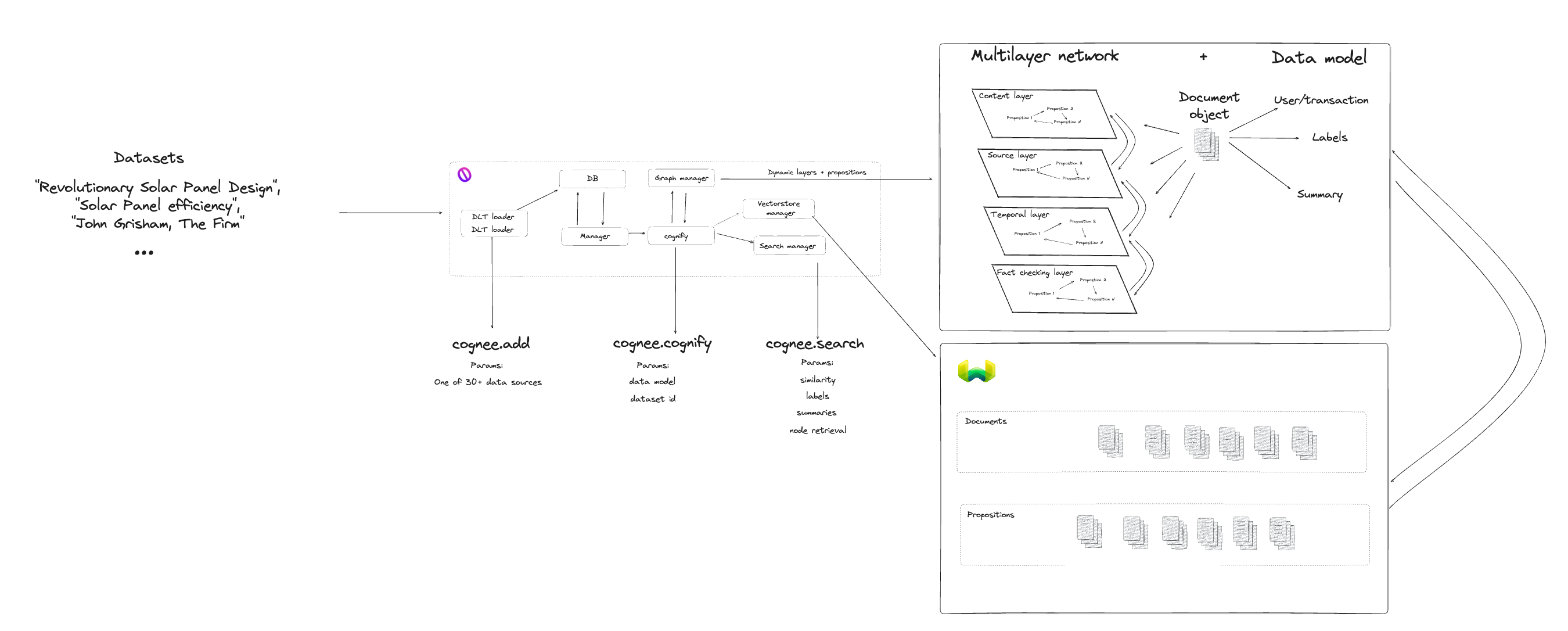
Architecture
How Cognee Enhances Your Contextual Memory
Our framework for the OpenAI, Graph (Neo4j) and Vector (Weaviate) databases introduces three key enhancements:
- Query Classifiers: Navigate information graph using Pydantic OpenAI classifiers.
- Document Topology: Structure and store documents in public and private domains.
- Personalized Context: Provide a context object to the LLM for a better response.