
240 lines
7.5 KiB
Markdown
240 lines
7.5 KiB
Markdown
# cognee
|
|
[](https://GitHub.com/topoteretes/cognee/network/)
|
|
[](https://GitHub.com/topoteretes/cognee/stargazers/)
|
|
[](https://GitHub.com/topoteretes/cognee/commit/)
|
|
[](https://github.com/topoteretes/cognee/tags/)
|
|
[](https://pepy.tech/project/cognee)
|
|
[](https://github.com/topoteretes/cognee/blob/master/LICENSE)
|
|
|
|
|
|
We build for developers who need a reliable, production-ready data layer for AI applications
|
|
|
|
|
|
## What is cognee?
|
|
|
|
Cognee implements scalable, modular ECL (Extract, Cognify, Load) pipelines that allow you to interconnect and retrieve past conversations, documents, and audio transcriptions while reducing hallucinations, developer effort, and cost.
|
|
Try it in a Google Colab <a href="https://colab.research.google.com/drive/1g-Qnx6l_ecHZi0IOw23rg0qC4TYvEvWZ?usp=sharing">notebook</a> or have a look at our <a href="https://topoteretes.github.io/cognee">documentation</a>
|
|
|
|
If you have questions, join our <a href="https://discord.gg/NQPKmU5CCg">Discord</a> community
|
|
|
|
|
|
|
|
|
|
|
|
## 📦 Installation
|
|
|
|
### With pip
|
|
|
|
```bash
|
|
pip install cognee
|
|
```
|
|
|
|
|
|
### With poetry
|
|
|
|
```bash
|
|
poetry add cognee
|
|
```
|
|
|
|
|
|
## 💻 Basic Usage
|
|
|
|
### Setup
|
|
|
|
```
|
|
import os
|
|
|
|
os.environ["LLM_API_KEY"] = "YOUR OPENAI_API_KEY"
|
|
|
|
```
|
|
or
|
|
```
|
|
import cognee
|
|
cognee.config.llm_api_key = "YOUR_OPENAI_API_KEY"
|
|
```
|
|
You can also set the variables by creating .env file, here is our <a href="https://github.com/topoteretes/cognee/blob/main/.env.template">template.</a>
|
|
To use different LLM providers, for more info check out our <a href="https://topoteretes.github.io/cognee">documentation</a>
|
|
|
|
If you are using Networkx, create an account on Graphistry to visualize results:
|
|
```
|
|
cognee.config.set_graphistry_config({
|
|
"username": "YOUR_USERNAME",
|
|
"password": "YOUR_PASSWORD"
|
|
})
|
|
```
|
|
|
|
(Optional) To run the UI, go to cognee-frontend directory and run:
|
|
```
|
|
npm run dev
|
|
```
|
|
or run everything in a docker container:
|
|
```
|
|
docker-compose up
|
|
```
|
|
Then navigate to localhost:3000
|
|
|
|
### Simple example
|
|
|
|
Run the default cognee pipeline:
|
|
|
|
```
|
|
import cognee
|
|
|
|
text = """Natural language processing (NLP) is an interdisciplinary
|
|
subfield of computer science and information retrieval"""
|
|
|
|
await cognee.add(text) # Add a new piece of information
|
|
|
|
await cognee.cognify() # Use LLMs and cognee to create a knowledge graph
|
|
|
|
search_results = await cognee.search("INSIGHTS", {'query': 'NLP'}) # Query cognee for the insights
|
|
|
|
for result in search_results:
|
|
do_something_with_result(result)
|
|
```
|
|
|
|
|
|
### Create your own memory store
|
|
|
|
cognee framework consists of tasks that can be grouped into pipelines.
|
|
Each task can be an independent part of business logic, that can be tied to other tasks to form a pipeline.
|
|
These tasks persist data into your memory store enabling you to search for relevant context of past conversations, documents, or any other data you have stored.
|
|
|
|
|
|
### Example: Classify your documents
|
|
|
|
Here is an example of how it looks for a default cognify pipeline:
|
|
|
|
1. To prepare the data for the pipeline run, first we need to add it to our metastore and normalize it:
|
|
|
|
Start with:
|
|
```
|
|
text = """Natural language processing (NLP) is an interdisciplinary
|
|
subfield of computer science and information retrieval"""
|
|
|
|
await cognee.add(text) # Add a new piece of information
|
|
```
|
|
|
|
2. In the next step we make a task. The task can be any business logic we need, but the important part is that it should be encapsulated in one function.
|
|
|
|
Here we show an example of creating a naive LLM classifier that takes a Pydantic model and then stores the data in both the graph and vector stores after analyzing each chunk.
|
|
We provided just a snippet for reference, but feel free to check out the implementation in our repo.
|
|
|
|
```
|
|
async def chunk_naive_llm_classifier(
|
|
data_chunks: list[DocumentChunk],
|
|
classification_model: Type[BaseModel]
|
|
):
|
|
# Extract classifications asynchronously
|
|
chunk_classifications = await asyncio.gather(
|
|
*(extract_categories(chunk.text, classification_model) for chunk in data_chunks)
|
|
)
|
|
|
|
# Collect classification data points using a set to avoid duplicates
|
|
classification_data_points = {
|
|
uuid5(NAMESPACE_OID, cls.label.type)
|
|
for cls in chunk_classifications
|
|
} | {
|
|
uuid5(NAMESPACE_OID, subclass.value)
|
|
for cls in chunk_classifications
|
|
for subclass in cls.label.subclass
|
|
}
|
|
|
|
vector_engine = get_vector_engine()
|
|
collection_name = "classification"
|
|
|
|
# Define the payload schema
|
|
class Keyword(BaseModel):
|
|
uuid: str
|
|
text: str
|
|
chunk_id: str
|
|
document_id: str
|
|
|
|
# Ensure the collection exists and retrieve existing data points
|
|
if not await vector_engine.has_collection(collection_name):
|
|
await vector_engine.create_collection(collection_name, payload_schema=Keyword)
|
|
existing_points_map = {}
|
|
else:
|
|
existing_points_map = {}
|
|
return data_chunks
|
|
|
|
...
|
|
|
|
```
|
|
|
|
We have a large number of tasks that can be used in your pipelines, and you can also create your own tasks to fit your business logic.
|
|
|
|
|
|
3. Once we have our tasks, it is time to group them into a pipeline.
|
|
This simplified snippet demonstrates how tasks can be added to a pipeline, and how they can pass the information forward from one to another.
|
|
|
|
```
|
|
|
|
|
|
Task(
|
|
chunk_naive_llm_classifier,
|
|
classification_model = cognee_config.classification_model,
|
|
)
|
|
|
|
pipeline = run_tasks(tasks, documents)
|
|
|
|
```
|
|
|
|
To see the working code, check cognee.api.v1.cognify default pipeline in our repo.
|
|
|
|
|
|
## Vector retrieval, Graphs and LLMs
|
|
|
|
Cognee supports a variety of tools and services for different operations:
|
|
- **Modular**: Cognee is modular by nature, using tasks grouped into pipelines
|
|
|
|
- **Local Setup**: By default, LanceDB runs locally with NetworkX and OpenAI.
|
|
|
|
- **Vector Stores**: Cognee supports Qdrant and Weaviate for vector storage.
|
|
|
|
- **Language Models (LLMs)**: You can use either Anyscale or Ollama as your LLM provider.
|
|
|
|
- **Graph Stores**: In addition to LanceDB, Neo4j is also supported for graph storage.
|
|
|
|
- **User management**: Create individual user graphs and manage permissions
|
|
|
|
## Demo
|
|
|
|
Check out our demo notebook [here](https://github.com/topoteretes/cognee/blob/main/notebooks/cognee%20-%20Get%20Started.ipynb)
|
|
|
|
|
|
|
|
[<img src="https://i3.ytimg.com/vi/-ARUfIzhzC4/maxresdefault.jpg" width="100%">](https://www.youtube.com/watch?v=BDFt4xVPmro "Learn about cognee: 55")
|
|
|
|
|
|
## Get Started
|
|
|
|
### Install Server
|
|
|
|
Please see the [cognee Quick Start Guide](https://topoteretes.github.io/cognee/quickstart/) for important configuration information.
|
|
|
|
```bash
|
|
docker compose up
|
|
```
|
|
|
|
|
|
### Install SDK
|
|
|
|
Please see the cognee [Development Guide](https://topoteretes.github.io/cognee/quickstart/) for important beta information and usage instructions.
|
|
|
|
```bash
|
|
pip install cognee
|
|
```
|
|
|
|
## Star History
|
|
|
|
[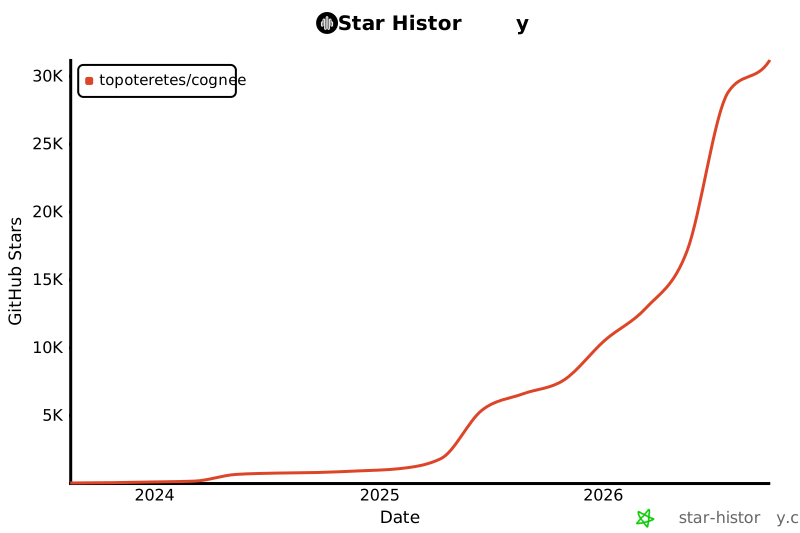](https://star-history.com/#topoteretes/cognee&Date)
|
|
|
|
|
|
## 💫 Contributors
|
|
|
|
<a href="https://github.com/traceloop/openllmetry/graphs/contributors">
|
|
<img alt="contributors" src="https://contrib.rocks/image?repo=topoteretes/cognee"/>
|
|
</a>
|
|
|
|
|