 0ee77b788a
<!-- .github/pull_request_template.md -->

## Description
Adds docker description to cognee-mcp

## DCO Affirmation
I affirm that all code in every commit of this pull request conforms to
the terms of the Topoteretes Developer Certificate of Origin.
214 lines
8.4 KiB
Markdown
214 lines
8.4 KiB
Markdown
<div align="center">
|
||
<a href="https://github.com/topoteretes/cognee">
|
||
<img src="https://raw.githubusercontent.com/topoteretes/cognee/refs/heads/dev/assets/cognee-logo-transparent.png" alt="Cognee Logo" height="60">
|
||
</a>
|
||
|
||
<br />
|
||
|
||
cognee‑mcp - Run cognee’s memory engine as a Model Context Protocol server
|
||
|
||
<p align="center">
|
||
<a href="https://www.youtube.com/watch?v=1bezuvLwJmw&t=2s">Demo</a>
|
||
.
|
||
<a href="https://cognee.ai">Learn more</a>
|
||
·
|
||
<a href="https://discord.gg/NQPKmU5CCg">Join Discord</a>
|
||
·
|
||
<a href="https://www.reddit.com/r/AIMemory/">Join r/AIMemory</a>
|
||
</p>
|
||
|
||
|
||
[](https://GitHub.com/topoteretes/cognee/network/)
|
||
[](https://GitHub.com/topoteretes/cognee/stargazers/)
|
||
[](https://GitHub.com/topoteretes/cognee/commit/)
|
||
[](https://github.com/topoteretes/cognee/tags/)
|
||
[](https://pepy.tech/project/cognee)
|
||
[](https://github.com/topoteretes/cognee/blob/main/LICENSE)
|
||
[](https://github.com/topoteretes/cognee/graphs/contributors)
|
||
|
||
<a href="https://www.producthunt.com/posts/cognee?embed=true&utm_source=badge-top-post-badge&utm_medium=badge&utm_souce=badge-cognee" target="_blank"><img src="https://api.producthunt.com/widgets/embed-image/v1/top-post-badge.svg?post_id=946346&theme=light&period=daily&t=1744472480704" alt="cognee - Memory for AI Agents  in 5 lines of code | Product Hunt" style="width: 250px; height: 54px;" width="250" height="54" /></a>
|
||
|
||
<a href="https://trendshift.io/repositories/13955" target="_blank"><img src="https://trendshift.io/api/badge/repositories/13955" alt="topoteretes%2Fcognee | Trendshift" style="width: 250px; height: 55px;" width="250" height="55"/></a>
|
||
|
||
|
||
Build memory for Agents and query from any client that speaks MCP – in your terminal or IDE.
|
||
|
||
</div>
|
||
|
||
## ✨ Features
|
||
|
||
- SSE & stdio transports – choose real‑time streaming --transport sse or the classic stdio pipe
|
||
- Integrated logging – all actions written to a rotating file (see get_log_file_location()) and mirrored to console in dev
|
||
- Local file ingestion – feed .md, source files, Cursor rule‑sets, etc. straight from disk
|
||
- Background pipelines – long‑running cognify & codify jobs spawn off‑thread; check progress with status tools
|
||
- Developer rules bootstrap – one call indexes .cursorrules, .cursor/rules, AGENT.md, and friends into the developer_rules nodeset
|
||
- Prune & reset – wipe memory clean with a single prune call when you want to start fresh
|
||
|
||
Please refer to our documentation [here](https://docs.cognee.ai/how-to-guides/deployment/mcp) for further information.
|
||
|
||
## 🚀 Quick Start
|
||
|
||
1. Clone cognee repo
|
||
```
|
||
git clone https://github.com/topoteretes/cognee.git
|
||
```
|
||
2. Navigate to cognee-mcp subdirectory
|
||
```
|
||
cd cognee/cognee-mcp
|
||
```
|
||
3. Install uv if you don't have one
|
||
```
|
||
pip install uv
|
||
```
|
||
4. Install all the dependencies you need for cognee mcp server with uv
|
||
```
|
||
uv sync --dev --all-extras --reinstall
|
||
```
|
||
5. Activate the virtual environment in cognee mcp directory
|
||
```
|
||
source .venv/bin/activate
|
||
```
|
||
6. Set up your OpenAI API key in .env for a quick setup with the default cognee configurations
|
||
```
|
||
LLM_API_KEY="YOUR_OPENAI_API_KEY"
|
||
```
|
||
7. Run cognee mcp server with stdio (default)
|
||
```
|
||
python src/server.py
|
||
```
|
||
or stream responses over SSE
|
||
```
|
||
python src/server.py --transport sse
|
||
```
|
||
|
||
You can do more advanced configurations by creating .env file using our <a href="https://github.com/topoteretes/cognee/blob/main/.env.template">template.</a>
|
||
To use different LLM providers / database configurations, and for more info check out our <a href="https://docs.cognee.ai">documentation</a>.
|
||
|
||
|
||
## 🐳 Docker Usage
|
||
|
||
If you’d rather run cognee-mcp in a container, you have two options:
|
||
|
||
1. **Build locally**
|
||
1. Make sure you are in /cognee root directory and have a fresh `.env` containing only your `LLM_API_KEY` (and your chosen settings).
|
||
2. Remove any old image and rebuild:
|
||
```bash
|
||
docker rmi cognee/cognee-mcp:main || true
|
||
docker build --no-cache -f cognee-mcp/Dockerfile -t cognee/cognee-mcp:main .
|
||
```
|
||
3. Run it:
|
||
```bash
|
||
docker run --env-file ./.env -p 8000:8000 --rm -it cognee/cognee-mcp:main
|
||
```
|
||
2. **Pull from Docker Hub** (no build required):
|
||
```bash
|
||
# With your .env file
|
||
docker run --env-file ./.env -p 8000:8000 --rm -it cognee/cognee-mcp:main
|
||
|
||
|
||
## 💻 Basic Usage
|
||
|
||
The MCP server exposes its functionality through tools. Call them from any MCP client (Cursor, Claude Desktop, Cline, Roo and more).
|
||
|
||
|
||
### Available Tools
|
||
|
||
- cognify: Turns your data into a structured knowledge graph and stores it in memory
|
||
|
||
- codify: Analyse a code repository, build a code graph, stores it in memory
|
||
|
||
- search: Query memory – supports GRAPH_COMPLETION, RAG_COMPLETION, CODE, CHUNKS, INSIGHTS
|
||
|
||
- prune: Reset cognee for a fresh start
|
||
|
||
- cognify_status / codify_status: Track pipeline progress
|
||
|
||
Remember – use the CODE search type to query your code graph. For huge repos, run codify on modules incrementally and cache results.
|
||
|
||
### IDE Example: Cursor
|
||
|
||
1. After you run the server as described in the [Quick Start](#-quickstart), create a run script for cognee. Here is a simple example:
|
||
```
|
||
#!/bin/bash
|
||
export ENV=local
|
||
export TOKENIZERS_PARALLELISM=false
|
||
export EMBEDDING_PROVIDER="fastembed"
|
||
export EMBEDDING_MODEL="sentence-transformers/all-MiniLM-L6-v2"
|
||
export EMBEDDING_DIMENSIONS=384
|
||
export EMBEDDING_MAX_TOKENS=256
|
||
export LLM_API_KEY=your-OpenAI-API-key
|
||
uv --directory /{cognee_root_path}/cognee-mcp run cognee
|
||
```
|
||
Remember to replace *your-OpenAI-API-key* and *{cognee_root_path}* with correct values.
|
||
|
||
2. Install Cursor and navigate to Settings → MCP Tools → New MCP Server
|
||
|
||
3. Cursor will open *mcp.json* file in a new tab. Configure your cognee MCP server by copy-pasting the following:
|
||
```
|
||
{
|
||
"mcpServers": {
|
||
"cognee": {
|
||
"command": "sh",
|
||
"args": [
|
||
"/{path-to-your-script}/run-cognee.sh"
|
||
]
|
||
}
|
||
}
|
||
}
|
||
```
|
||
Remember to replace *{path-to-your-script}* with the correct value of the path of the script you created in the first step.
|
||
|
||
That's it! You can refresh the server from the toggle next to your new cognee server. Check the green dot and the available tools to verify your server is running.
|
||
|
||
Now you can open your Cursor Agent and start using cognee tools from it via prompting.
|
||
|
||
|
||
## Development and Debugging
|
||
|
||
### Debugging
|
||
|
||
To use debugger, run:
|
||
```bash
|
||
mcp dev src/server.py
|
||
```
|
||
|
||
Open inspector with timeout passed:
|
||
```
|
||
http://localhost:5173?timeout=120000
|
||
```
|
||
|
||
To apply new changes while developing cognee you need to do:
|
||
|
||
1. `poetry lock` in cognee folder
|
||
2. `uv sync --dev --all-extras --reinstall`
|
||
3. `mcp dev src/server.py`
|
||
|
||
### Development
|
||
|
||
In order to use local cognee:
|
||
|
||
1. Uncomment the following line in the cognee-mcp [`pyproject.toml`](pyproject.toml) file and set the cognee root path.
|
||
```
|
||
#"cognee[postgres,codegraph,gemini,huggingface,docs,neo4j] @ file:/Users/<username>/Desktop/cognee"
|
||
```
|
||
Remember to replace `file:/Users/<username>/Desktop/cognee` with your actual cognee root path.
|
||
|
||
2. Install dependencies with uv in the mcp folder
|
||
```
|
||
uv sync --reinstall
|
||
```
|
||
|
||
## Code of Conduct
|
||
|
||
We are committed to making open source an enjoyable and respectful experience for our community. See <a href="https://github.com/topoteretes/cognee/blob/main/CODE_OF_CONDUCT.md"><code>CODE_OF_CONDUCT</code></a> for more information.
|
||
|
||
## 💫 Contributors
|
||
|
||
<a href="https://github.com/topoteretes/cognee/graphs/contributors">
|
||
<img alt="contributors" src="https://contrib.rocks/image?repo=topoteretes/cognee"/>
|
||
</a>
|
||
|
||
|
||
## Star History
|
||
|
||
[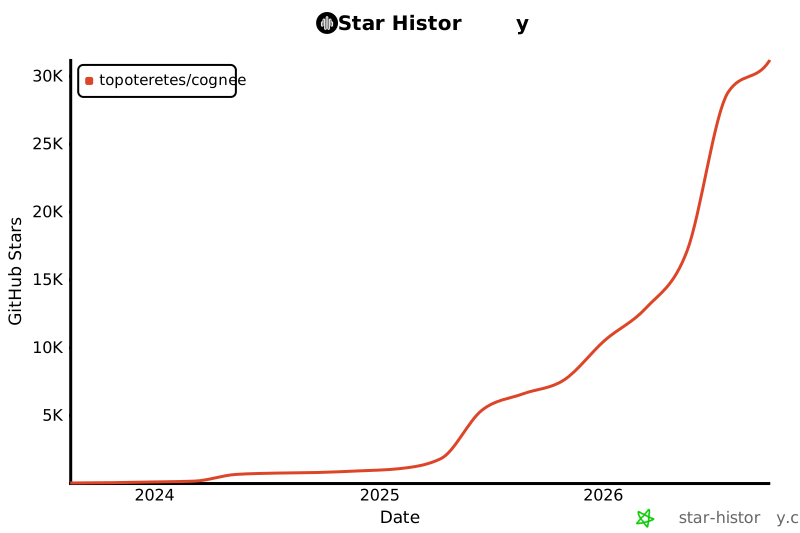](https://star-history.com/#topoteretes/cognee&Date)
|