
5.8 KiB

🚀 LightRAG: Specialized Production Fork


A production-ready fork of LightRAG featuring S3 storage integration, a modernized Web UI, and a robust API.
🔱 About This Fork
This repository is a specialized fork of LightRAG, designed to bridge the gap between research and production. While preserving the core "Simple and Fast" philosophy, we have added critical infrastructure components:
- ☁️ S3 Storage Integration: Native support for S3-compatible object storage (AWS, MinIO, Cloudflare R2) for scalable document and artifact management.
- 🖥️ Modern Web UI: A completely redesigned interface featuring:
- S3 Browser: Integrated file management system.
- File Viewers: Built-in PDF and text viewers.
- Enhanced Layout: Resizable panes and improved UX.
- 🔌 Robust API: Expanded REST endpoints supporting multipart uploads, bulk operations, and advanced search parameters.
- 🛡️ Code Quality: Comprehensive type hinting (Pyright strict), Ruff formatting, and extensive test coverage for critical paths.
📖 Introduction to LightRAG
LightRAG incorporates graph structures into text indexing and retrieval processes. This innovative framework employs a dual-level retrieval system that enhances comprehensive information retrieval from low-level entities to high-level broader topics.
Algorithm Flowchart
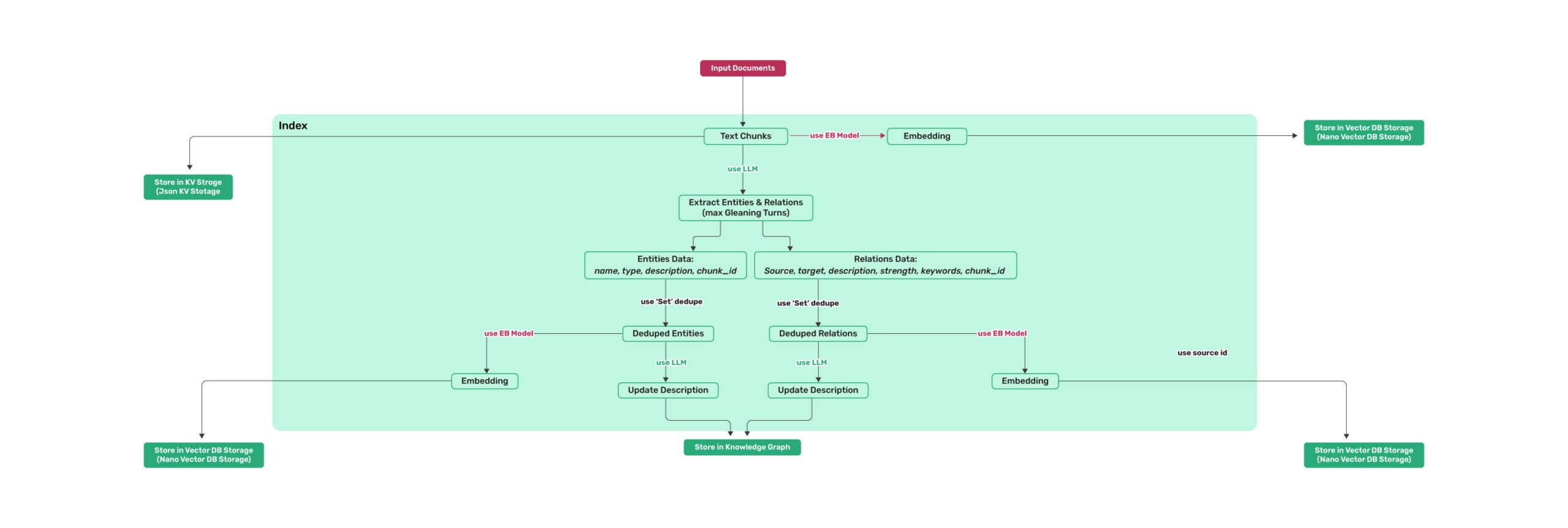 Figure 1: LightRAG Indexing Flowchart (Source)
⚡ Quick Start
1. Installation
This project uses uv for fast and reliable package management.
Option A: Install from PyPI
uv pip install "lightrag-hku[api]"
Option B: Install from Source (Recommended for this Fork)
git clone https://github.com/YourUsername/LightRAG.git
cd LightRAG
uv sync --extra api
source .venv/bin/activate
2. Running the Server (UI + API)
The easiest way to experience the enhancements in this fork is via the LightRAG Server.
-
Configure Environment:
cp env.example .env # Edit .env to add your API keys (OpenAI/Azure/etc.) and S3 credentials -
Start the Server:
lightrag-server -
Access the UI: Open http://localhost:9600 to view the Knowledge Graph, upload files via the S3 browser, and perform queries.
3. Python API Example
You can also use LightRAG directly in your Python code:
import os
import asyncio
from lightrag import LightRAG, QueryParam
from lightrag.llm.openai import gpt_4o_mini_complete, openai_embed

WORKING_DIR = "./rag_storage"
if not os.path.exists(WORKING_DIR):
    os.mkdir(WORKING_DIR)

async def main():
    # Initialize LightRAG
    rag = LightRAG(
        working_dir=WORKING_DIR,
        embedding_func=openai_embed,
        llm_model_func=gpt_4o_mini_complete,
    )
    await rag.initialize_storages()

    # Insert Document
    await rag.ainsert("LightRAG is a retrieval-augmented generation framework.")

    # Query
    print(await rag.aquery(
        "What is LightRAG?",
        param=QueryParam(mode="hybrid")
    ))

if __name__ == "__main__":
    asyncio.run(main())
📦 Features & Architecture
Storage Backends
LightRAG supports multiple storage backends. This fork adds robust S3 support for document storage.
| Type | Implementations |
|---|---|
| KV Storage | JsonKVStorage, PGKVStorage, RedisKVStorage, MongoKVStorage |
| Vector Storage | NanoVectorDB, PGVector, Milvus, Chroma, Qdrant, Faiss |
| Graph Storage | NetworkX, Neo4J, AGE (PostgreSQL), Memgraph |
| Object Storage | S3Storage (New), LocalFileStorage |
Specialized API Routes
This fork exposes additional endpoints:
POST /documents/upload: Multipart file upload (supports PDF, TXT, MD).GET /storage/list: List files in S3/Local storage.GET /storage/content: Retrieve file content.
🛠️ Configuration
See env.example for a complete list of configuration options. Key variables for this fork:
# S3 Configuration (Optional)
S3_ENDPOINT_URL=https://<accountid>.r2.cloudflarestorage.com
S3_ACCESS_KEY_ID=<your_access_key>
S3_SECRET_ACCESS_KEY=<your_secret_key>
S3_BUCKET_NAME=lightrag-docs
📚 Documentation
🤝 Contribution
Contributions are welcome! Please ensure you:
- Install development dependencies:
uv sync --extra test - Run tests before submitting:
pytest tests/ - Format code:
ruff format .
📜 License
This project is licensed under the MIT License. See the LICENSE file for details.